rocco leung

go-Mail
go-Mail
Project Type
Case Study
Individual Case
Time Period
Year - 2025
Duration - 8 Weeks
Deliverables
High Fidelity Prototype
User Research
Time Period
Year - 2025
Duration - 8 Weeks
Brief
In today’s world, email has become an essential part of communication and business. It is not only a means of communication but a highly effective marketing tool. Today an estimated 4.6 billion people use email. The average office worker receives up to 80-121 emails a day, 49% of those contributing to spam. On average employees spend an average of 11-15 hours per week managing and organizing emails. A study conducted within Microsoft confirms that the average employee receives up to 117 emails per day and an additional 153 Teams messages, and on average employees are interrupted every two minutes from such notifications. This global study, which analyzed 31,000 Swiss workers revealed that 48% of those workers reported that work weeks often felt chaotic and fragmented, with suggestions of AI to help sort workloads by assisting in daily routines.
Tools such as email sorters are fairly powerful tools but are vastly under-utilized whilst also fairly niche. Such tools allow for improved organization, work efficiency and time management, and enhanced collaboration and teamwork. In response I aim to design an email sorter, but also a work-based sorting system that optimizes work flows by sorting inquiries, meetings, global company notifications and more.
Challenge
Email is a commonly used source of communication and information however the ease of accessing important or prioritized emails can be hindered by overloaded inboxes and unwanted emails and other kinds of clutter. These emails can pile onto each other thus hindering productivity. This is especially detrimental when needing to track important emails relating to things such as business and finance. Thus, there is a need to create an effective method where emails are easily sorted, tracked and controlled.
User Research
Email is a commonly used source of communication and information however the ease of accessing important or prioritized emails can be hindered by overloaded inboxes and unwanted emails and other kinds of clutter. These emails can pile onto each other thus hindering productivity. This is especially detrimental when needing to track important emails relating to things such as business and finance. Thus, there is a need to create an effective method where emails are easily sorted, tracked and controlled.
How often do you use Email, work and personal?
How often do you spend using email a week (reading, sending, other)?
Is there a positive or negative user experience when using email. How and why?
Is email clutter a particular issue for you. What are the issues relating to email clutter?
Do you often receive emails that have little relevance to your current life. Has it ever hindered or discouraged the use of email?
Could email benefit from an improved sorting and prioritizing system?
Does email have enough features that organize and sort messages?
Would a feature that provides automatic scanning allow for easier sorting, cleaning, prioritization provide benefit. How could it be implemented?
How would you improve on email as an experience from user satisfaction, features, formats and UI?
My Role
UX Lead
Interaction Design
Usability Testing
Prototyping
User Flows
Deliverables
High Fidelity Prototype
User Research
Project Type
Case Study
Individual Case
Time Period
Year - 2025
Duration - 8 Weeks
Brief
In today’s world, email has become an essential part of communication and business. It is not only a means of communication but a highly effective marketing tool. Today an estimated 4.6 billion people use email. The average office worker receives up to 80-121 emails a day, 49% of those contributing to spam. On average employees spend an average of 11-15 hours per week managing and organising emails. A study conducted within Microsoft confirms that the average employee receives up to 117 emails per day and an additional 153 Teams messages, and on average employees are interrupted every two minutes from such notifications. This global study, which analysed 31,000 Swiss workers revealed that 48% of those workers reported that work weeks often felt chaotic and fragmented, with suggestions of AI to help sort workloads by assisting in daily routines.
Tools such as email sorters are fairly powerful tools but are vastly under-utilised whilst also fairly niche. Such tools allow for improved organisation, work efficiency and time management, and enhanced collaboration and teamwork. In response I aim to design an email sorter, but also a work-based sorting system that optimises work flows by sorting inquiries, meetings, global company notifications and more.
Challenge
Email is a commonly used source of communication and information however the ease of accessing important or prioritised emails can be hindered by overloaded inboxes and unwanted emails and other kinds of clutter. These emails can pile onto each other thus hindering productivity. This is especially detrimental when needing to track important emails relating to things such as business and finance. Thus, there is a need to create an effective method where emails are easily sorted, tracked and controlled.
User Research
Email is a commonly used source of communication and information however the ease of accessing important or prioritised emails can be hindered by overloaded inboxes and unwanted emails and other kinds of clutter. These emails can pile onto each other thus hindering productivity. This is especially detrimental when needing to track important emails relating to things such as business and finance. Thus, there is a need to create an effective method where emails are easily sorted, tracked and controlled.
How often do you use Email, work and personal?
How often do you spend using email a week (reading, sending, other)?
Is there a positive or negative user experience when using email. How and why?
Is email clutter a particular issue for you. What are the issues relating to email clutter?
Do you often receive emails that have little relevance to your current life. Has it ever hindered or discouraged the use of email?
Could email benefit from an improved sorting and prioritising system?
Does email have enough features that organise and sort messages?
Would a feature that provides automatic scanning allow for easier sorting, cleaning, prioritisation provide benefit. How could it be implemented?
How would you improve on email as an experience from user satisfaction, features, formats and UI?
Results
User research comprised of three full-time working adults, 2 male and one female. The ages of those interviewed, included a 24 and 56-year-old male and a 57-year-old female. All three interviewed frequently and heavily use email within the working week, one of them rarely uses personal email.
Time spent using email
Out of 3 respondents 2 said, 5 days a week, whilst the other 6-7 days a week.
Positive and negative experiences using email
A general consensus conveyed that email, allows communication to people, other tools are better for direct communication, and design is mostly utilitarian serving only to complete its function. Has it’s necessary features, but not much else.
Receiving spam and sorting through clutter
Two respondents don’t have any issues, deleting most unwanted emails and only reading relevant ones. Second respondent has many junk mails, mostly shopping and promotions and usually has to spend time manually clearing them.
Email sorting systems
All respondents said it would be helpful for more organization tools to be added, manual flagging could be improved via keyword screening or sorting highlighting senders. Whilst email has sorting features, specific targeting of certain mails can be improved to make them easy to find.
Improving sorting systems and email
Has a good experience using outlook, but could possibly improve it. Automatic sorting would still need to be screened without deleting without permission.
User Insights
There were total three participants interviewed. All respondents noted that email was perfectly functional for work related purposes. All respondents noted that email had all its necessary functions making it perfect at what it needs to do: send and read messages. However, two of them noted that organization functionality could be improved. 2 users would sort emails using some of noting that flagging systems or search were the best ways to keep track of emails, however all needed to be manually checked. 2 users were unsure of how to improve sorting and email prioritization whilst one suggested more categorization and filtering options, whilst the other felt it worked perfectly fine.
User Needs
To create a first prototype, we must identify the target audience’s needs and goals. Who is the target audience? Office workers, contractors, corporate jobs, and workers of this variety. This product will be most likely used by those who belong in these industries whilst are most likely to be aged 22+. The goal is to help reduce the time inside work and outside work hours spending time sorting through emails, whilst also sorting out those emails to their exact locations improving efficiency and productivity. It has first been adopted into a mobile app, but desktop is also a priority.
User Personas
User Personas


User Personas
Journey Map
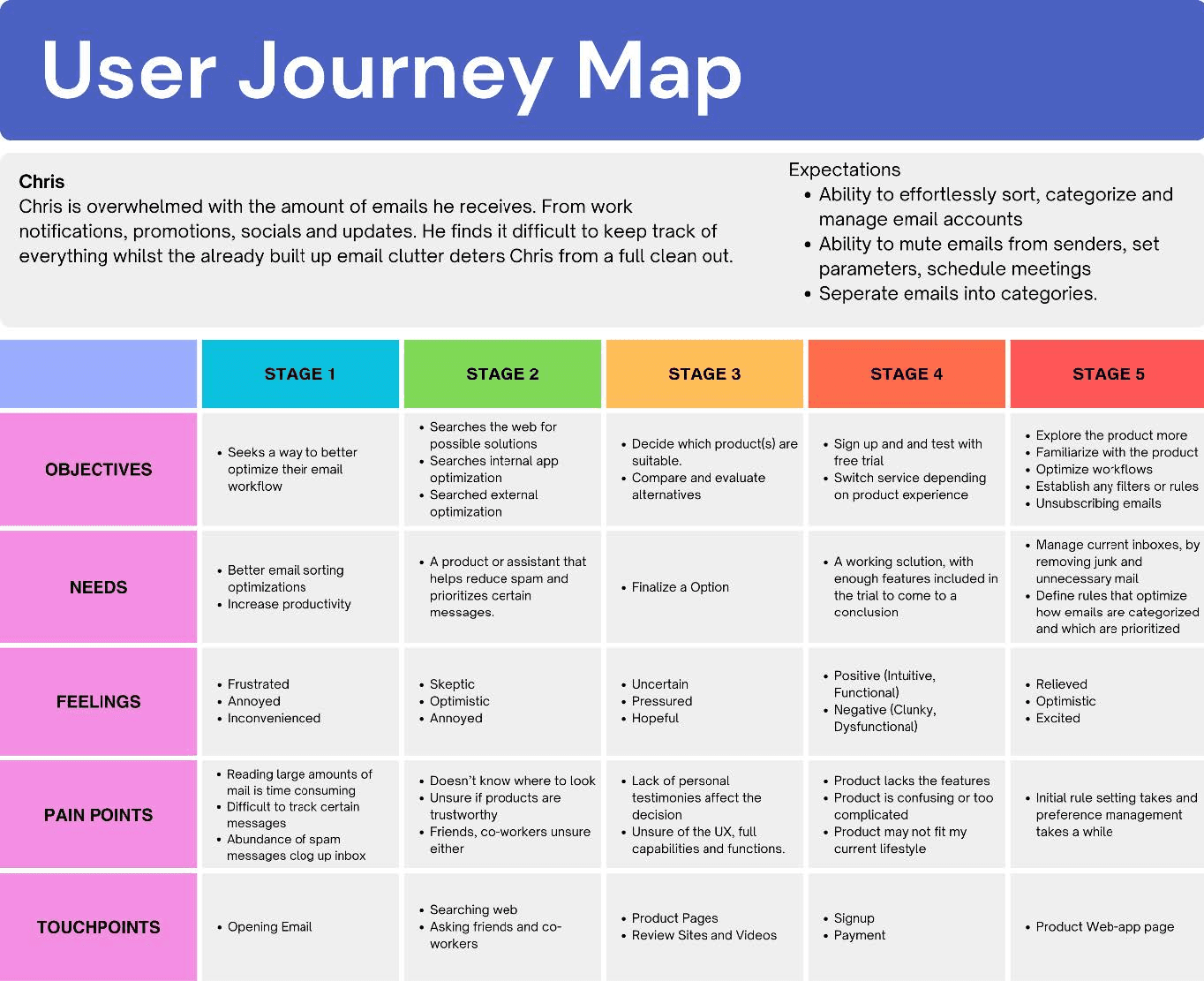
The user journey map below highlights key aspects from initial discovery to post-purchase usage. It highlights needs and pain points that come in each stage. Touch points highlights points where the user interacts and engages with.
User Flow
Before sketching and wire-framing, the user flow was created outlining the structure and app navigation. The outline showcasing the general flow of the app:
1. The on-boarding process begins with standard signup process; where users will enter their details linking their email account.
2. Users will be told some of the basic functionalities and features, guided through the process.
3. Most app functionalities are accessible from the dashboard(home), otherwise accessed through the side menu. The navigation is split into 3 drop-downs; profile settings, tools and quick access. Profile settings relate to app settings, payments, accounts, help and terms and conditions. Tools relate to functions that sort and clean emails, and quick access resembles your standard email UI, for easy access without switching between apps.
4. View summaries that show messages, cleared, filtered, sorted and blocked, keep tangible use and feedback after each clean. Will refresh bi-weekly,app will give updates in summaries with future.
Information Architecture

User Personas
Results
User research comprised of three full-time working adults, 2 male and one female. The ages of those interviewed, included a 24 and 56-year-old male and a 57-year-old female. All three interviewed frequently and heavily use email within the working week, one of them rarely uses personal email.
Time spent using email
Out of 3 respondents 2 said, 5 days a week, whilst the other 6-7 days a week.
Positive and negative experiences using email
A general consensus conveyed that email, allows communication to people, other tools are better for direct communication, and design is mostly utilitarian serving only to complete its function. Has it’s necessary features, but not much else.
Receiving spam and sorting through clutter
Two respondents don’t have any issues, deleting most unwanted emails and only reading relevant ones. Second respondent has many junk mails, mostly shopping and promotions and usually has to spend time manually clearing them.
Email sorting systems
All respondents said it would be helpful for more organization tools to be added, manual flagging could be improved via keyword screening or sorting highlighting senders. Whilst email has sorting features, specific targeting of certain mails can be improved to make them easy to find.
Improving sorting systems and email
Has a good experience using outlook, but could possibly improve it. Automatic sorting would still need to be screened without deleting without permission.
How often do you use Email, work and personal?
How often do you spend using email a week (reading, sending, other)?
Is there a positive or negative user experience when using email. How and why?
Is email clutter a particular issue for you. What are the issues relating to email clutter?
Do you often receive emails that have little relevance to your current life. Has it ever hindered or discouraged the use of email?
Could email benefit from an improved sorting and prioritizing system?
Does email have enough features that organize and sort messages?
Would a feature that provides automatic scanning allow for easier sorting, cleaning, prioritization provide benefit. How could it be implemented?
How would you improve on email as an experience from user satisfaction, features, formats and UI?
Results
User research comprised of three full-time working adults, 2 male and one female. The ages of those interviewed, included a 24 and 56-year-old male and a 57-year-old female. All three interviewed frequently and heavily use email within the working week, one of them rarely uses personal email.
Time spent using email
Out of 3 respondents 2 said, 5 days a week, whilst the other 6-7 days a week.
Positive and negative experiences using email
A general consensus conveyed that email, allows communication to people, other tools are better for direct communication, and design is mostly utilitarian serving only to complete its function. Has it’s necessary features, but not much else.
Receiving spam and sorting through clutter
Two respondents don’t have any issues, deleting most unwanted emails and only reading relevant ones. Second respondent has many junk mails, mostly shopping and promotions and usually has to spend time manually clearing them.
Email sorting systems
All respondents said it would be helpful for more organization tools to be added, manual flagging could be improved via keyword screening or sorting highlighting senders. Whilst email has sorting features, specific targeting of certain mails can be improved to make them easy to find.
Improving sorting systems and email
Has a good experience using outlook, but could possibly improve it. Automatic sorting would still need to be screened without deleting without permission.
User Insights
There were total three participants interviewed. All respondents noted that email was perfectly functional for work related purposes. All respondents noted that email had all its necessary functions making it perfect at what it needs to do: send and read messages. However, two of them noted that organisation functionality could be improved. 2 users would sort emails using some of noting that flagging systems or search were the best ways to keep track of emails, however all needed to be manually checked. 2 users were unsure of how to improve sorting and email prioritisation whilst one suggested more categorisation and filtering options, whilst the other felt it worked perfectly fine.
User Needs
To create a first prototype, we must identify the target audience’s needs and goals. Who is the target audience? Office workers, contractors, corporate jobs, and workers of this variety. This product will be most likely used by those who belong in these industries whilst are most likely to be aged 22+. The goal is to help reduce the time inside work and outside work hours spending time sorting through emails, whilst also sorting out those emails to their exact locations improving efficiency and productivity. It has first been adopted into a mobile app, but desktop is also a priority.
Brief
In today’s world, email has become an essential part of communication and business. It is not only a means of communication but a highly effective marketing tool. Today an estimated 4.6 billion people use email. The average office worker receives up to 80-121 emails a day, 49% of those contributing to spam. On average employees spend an average of 11-15 hours per week managing and organising emails. A study conducted within Microsoft confirms that the average employee receives up to 117 emails per day and an additional 153 Teams messages, and on average employees are interrupted every two minutes from such notifications. This global study, which analysed 31,000 Swiss workers revealed that 48% of those workers reported that work weeks often felt chaotic and fragmented, with suggestions of AI to help sort workloads by assisting in daily routines.
Tools such as email sorters are fairly powerful tools but are vastly under-utilised whilst also fairly niche. Such tools allow for improved organisation, work efficiency and time management, and enhanced collaboration and teamwork. In response I aim to design an email sorter, but also a work-based sorting system that optimises work flows by sorting inquiries, meetings, global company notifications and more.
Challenge
Email is a commonly used source of communication and information however the ease of accessing important or prioritised emails can be hindered by overloaded inboxes and unwanted emails and other kinds of clutter. These emails can pile onto each other thus hindering productivity. This is especially detrimental when needing to track important emails relating to things such as business and finance. Thus, there is a need to create an effective method where emails are easily sorted, tracked and controlled.
User Research
Email is a commonly used source of communication and information however the ease of accessing important or prioritised emails can be hindered by overloaded inboxes and unwanted emails and other kinds of clutter. These emails can pile onto each other thus hindering productivity. This is especially detrimental when needing to track important emails relating to things such as business and finance. Thus, there is a need to create an effective method where emails are easily sorted, tracked and controlled.
How often do you use Email, work and personal?
How often do you spend using email a week (reading, sending, other)?
Is there a positive or negative user experience when using email. How and why?
Is email clutter a particular issue for you. What are the issues relating to email clutter?
Do you often receive emails that have little relevance to your current life. Has it ever hindered or discouraged the use of email?
Could email benefit from an improved sorting and prioritising system?
Does email have enough features that organise and sort messages?
Would a feature that provides automatic scanning allow for easier sorting, cleaning, prioritisation provide benefit. How could it be implemented?
How would you improve on email as an experience from user satisfaction, features, formats and UI?
My Role
UX Lead
Interaction Design
Usability Testing
Prototyping
User Flows
Deliverables
High Fidelity Prototype
User Research
Project Type
Case Study
Individual Case
Time Period
Year - 2025
Duration - 8 Weeks
Brief
In today’s world, email has become an essential part of communication and business. It is not only a means of communication but a highly effective marketing tool. Today an estimated 4.6 billion people use email. The average office worker receives up to 80-121 emails a day, 49% of those contributing to spam. On average employees spend an average of 11-15 hours per week managing and organizing emails. A study conducted within Microsoft confirms that the average employee receives up to 117 emails per day and an additional 153 Teams messages, and on average employees are interrupted every two minutes from such notifications. This global study, which analyzed 31,000 Swiss workers revealed that 48% of those workers reported that work weeks often felt chaotic and fragmented, with suggestions of AI to help sort workloads by assisting in daily routines.
Tools such as email sorters are fairly powerful tools but are vastly under-utilized whilst also fairly niche. Such tools allow for improved organization, work efficiency and time management, and enhanced collaboration and teamwork. In response I aim to design an email sorter, but also a work-based sorting system that optimizes work flows by sorting inquiries, meetings, global company notifications and more.
Challenge
Email is a commonly used source of communication and information however the ease of accessing important or prioritized emails can be hindered by overloaded inboxes and unwanted emails and other kinds of clutter. These emails can pile onto each other thus hindering productivity. This is especially detrimental when needing to track important emails relating to things such as business and finance. Thus, there is a need to create an effective method where emails are easily sorted, tracked and controlled.
User Research
Email is a commonly used source of communication and information however the ease of accessing important or prioritized emails can be hindered by overloaded inboxes and unwanted emails and other kinds of clutter. These emails can pile onto each other thus hindering productivity. This is especially detrimental when needing to track important emails relating to things such as business and finance. Thus, there is a need to create an effective method where emails are easily sorted, tracked and controlled.
How often do you use Email, work and personal?
How often do you spend using email a week (reading, sending, other)?
Is there a positive or negative user experience when using email. How and why?
Is email clutter a particular issue for you. What are the issues relating to email clutter?
Do you often receive emails that have little relevance to your current life. Has it ever hindered or discouraged the use of email?
Could email benefit from an improved sorting and prioritizing system?
Does email have enough features that organize and sort messages?
Would a feature that provides automatic scanning allow for easier sorting, cleaning, prioritization provide benefit. How could it be implemented?
How would you improve on email as an experience from user satisfaction, features, formats and UI?
Results
User research comprised of three full-time working adults, 2 male and one female. The ages of those interviewed, included a 24 and 56-year-old male and a 57-year-old female. All three interviewed frequently and heavily use email within the working week, one of them rarely uses personal email.
Time spent using email
Out of 3 respondents 2 said, 5 days a week, whilst the other 6-7 days a week.
Positive and negative experiences using email
A general consensus conveyed that email, allows communication to people, other tools are better for direct communication, and design is mostly utilitarian serving only to complete its function. Has it’s necessary features, but not much else.
Receiving spam and sorting through clutter
Two respondents don’t have any issues, deleting most unwanted emails and only reading relevant ones. Second respondent has many junk mails, mostly shopping and promotions and usually has to spend time manually clearing them.
Email sorting systems
All respondents said it would be helpful for more organization tools to be added, manual flagging could be improved via keyword screening or sorting highlighting senders. Whilst email has sorting features, specific targeting of certain mails can be improved to make them easy to find.
Improving sorting systems and email
Has a good experience using outlook, but could possibly improve it. Automatic sorting would still need to be screened without deleting without permission.
User Insights
There were total three participants interviewed. All respondents noted that email was perfectly functional for work related purposes. All respondents noted that email had all its necessary functions making it perfect at what it needs to do: send and read messages. However, two of them noted that organization functionality could be improved. 2 users would sort emails using some of noting that flagging systems or search were the best ways to keep track of emails, however all needed to be manually checked. 2 users were unsure of how to improve sorting and email prioritization whilst one suggested more categorization and filtering options, whilst the other felt it worked perfectly fine.
User Needs
To create a first prototype, we must identify the target audience’s needs and goals. Who is the target audience? Office workers, contractors, corporate jobs, and workers of this variety. This product will be most likely used by those who belong in these industries whilst are most likely to be aged 22+. The goal is to help reduce the time inside work and outside work hours spending time sorting through emails, whilst also sorting out those emails to their exact locations improving efficiency and productivity. It has first been adopted into a mobile app, but desktop is also a priority.
User Personas
Brief
In today’s world, email has become an essential part of communication and business. It is not only a means of communication but a highly effective marketing tool. Today an estimated 4.6 billion people use email. The average office worker receives up to 80-121 emails a day, 49% of those contributing to spam. On average employees spend an average of 11-15 hours per week managing and organizing emails. A study conducted within Microsoft confirms that the average employee receives up to 117 emails per day and an additional 153 Teams messages, and on average employees are interrupted every two minutes from such notifications. This global study, which analyzed 31,000 Swiss workers revealed that 48% of those workers reported that work weeks often felt chaotic and fragmented, with suggestions of AI to help sort workloads by assisting in daily routines.
Tools such as email sorters are fairly powerful tools but are vastly under-utilized whilst also fairly niche. Such tools allow for improved organization, work efficiency and time management, and enhanced collaboration and teamwork. In response I aim to design an email sorter, but also a work-based sorting system that optimizes work flows by sorting inquiries, meetings, global company notifications and more.
Challenge
Email is a commonly used source of communication and information however the ease of accessing important or prioritized emails can be hindered by overloaded inboxes and unwanted emails and other kinds of clutter. These emails can pile onto each other thus hindering productivity. This is especially detrimental when needing to track important emails relating to things such as business and finance. Thus, there is a need to create an effective method where emails are easily sorted, tracked and controlled.
User Research
Email is a commonly used source of communication and information however the ease of accessing important or prioritized emails can be hindered by overloaded inboxes and unwanted emails and other kinds of clutter. These emails can pile onto each other thus hindering productivity. This is especially detrimental when needing to track important emails relating to things such as business and finance. Thus, there is a need to create an effective method where emails are easily sorted, tracked and controlled.
How often do you use Email, work and personal?
How often do you spend using email a week (reading, sending, other)?
Is there a positive or negative user experience when using email. How and why?
Is email clutter a particular issue for you. What are the issues relating to email clutter?
Do you often receive emails that have little relevance to your current life. Has it ever hindered or discouraged the use of email?
Could email benefit from an improved sorting and prioritizing system?
Does email have enough features that organize and sort messages?
Would a feature that provides automatic scanning allow for easier sorting, cleaning, prioritization provide benefit. How could it be implemented?
How would you improve on email as an experience from user satisfaction, features, formats and UI?
Results
User research comprised of three full-time working adults, 2 male and one female. The ages of those interviewed, included a 24 and 56-year-old male and a 57-year-old female. All three interviewed frequently and heavily use email within the working week, one of them rarely uses personal email.
Time spent using email
Out of 3 respondents 2 said, 5 days a week, whilst the other 6-7 days a week.
Positive and negative experiences using email
A general consensus conveyed that email, allows communication to people, other tools are better for direct communication, and design is mostly utilitarian serving only to complete its function. Has it’s necessary features, but not much else.
Receiving spam and sorting through clutter
Two respondents don’t have any issues, deleting most unwanted emails and only reading relevant ones. Second respondent has many junk mails, mostly shopping and promotions and usually has to spend time manually clearing them.
Email sorting systems
All respondents said it would be helpful for more organization tools to be added, manual flagging could be improved via keyword screening or sorting highlighting senders. Whilst email has sorting features, specific targeting of certain mails can be improved to make them easy to find.
Improving sorting systems and email
Has a good experience using outlook, but could possibly improve it. Automatic sorting would still need to be screened without deleting without permission.
User Insights
There were total three participants interviewed. All respondents noted that email was perfectly functional for work related purposes. All respondents noted that email had all its necessary functions making it perfect at what it needs to do: send and read messages. However, two of them noted that organization functionality could be improved. 2 users would sort emails using some of noting that flagging systems or search were the best ways to keep track of emails, however all needed to be manually checked. 2 users were unsure of how to improve sorting and email prioritization whilst one suggested more categorization and filtering options, whilst the other felt it worked perfectly fine.
User Needs
To create a first prototype, we must identify the target audience’s needs and goals. Who is the target audience? Office workers, contractors, corporate jobs, and workers of this variety. This product will be most likely used by those who belong in these industries whilst are most likely to be aged 22+. The goal is to help reduce the time inside work and outside work hours spending time sorting through emails, whilst also sorting out those emails to their exact locations improving efficiency and productivity. It has first been adopted into a mobile app, but desktop is also a priority.
f
Results
User research comprised of three full-time working adults, 2 male and one female. The ages of those interviewed, included a 24 and 56-year-old male and a 57-year-old female. All three interviewed frequently and heavily use email within the working week, one of them rarely uses personal email.
Time spent using email
Out of 3 respondents 2 said, 5 days a week, whilst the other 6-7 days a week.
Positive and negative experiences using email
A general consensus conveyed that email, allows communication to people, other tools are better for direct communication, and design is mostly utilitarian serving only to complete its function. Has it’s necessary features, but not much else.
Receiving spam and sorting through clutter
Two respondents don’t have any issues, deleting most unwanted emails and only reading relevant ones. Second respondent has many junk mails, mostly shopping and promotions and usually has to spend time manually clearing them.
Email sorting systems
All respondents said it would be helpful for more organization tools to be added, manual flagging could be improved via keyword screening or sorting highlighting senders. Whilst email has sorting features, specific targeting of certain mails can be improved to make them easy to find.
Improving sorting systems and email
Has a good experience using outlook, but could possibly improve it. Automatic sorting would still need to be screened without deleting without permission.
User Insights
There were total three participants interviewed. All respondents noted that email was perfectly functional for work related purposes. All respondents noted that email had all its necessary functions making it perfect at what it needs to do: send and read messages. However, two of them noted that organization functionality could be improved. 2 users would sort emails using some of noting that flagging systems or search were the best ways to keep track of emails, however all needed to be manually checked. 2 users were unsure of how to improve sorting and email prioritization whilst one suggested more categorization and filtering options, whilst the other felt it worked perfectly fine.
User Needs
To create a first prototype, we must identify the target audience’s needs and goals. Who is the target audience? Office workers, contractors, corporate jobs, and workers of this variety. This product will be most likely used by those who belong in these industries whilst are most likely to be aged 22+. The goal is to help reduce the time inside work and outside work hours spending time sorting through emails, whilst also sorting out those emails to their exact locations improving efficiency and productivity. It has first been adopted into a mobile app, but desktop is also a priority.
f
Results
User research comprised of three full-time working adults, 2 male and one female. The ages of those interviewed, included a 24 and 56-year-old male and a 57-year-old female. All three interviewed frequently and heavily use email within the working week, one of them rarely uses personal email.
Time spent using email
Out of 3 respondents 2 said, 5 days a week, whilst the other 6-7 days a week.
Positive and negative experiences using email
A general consensus conveyed that email, allows communication to people, other tools are better for direct communication, and design is mostly utilitarian serving only to complete its function. Has it’s necessary features, but not much else.
Receiving spam and sorting through clutter
Two respondents don’t have any issues, deleting most unwanted emails and only reading relevant ones. Second respondent has many junk mails, mostly shopping and promotions and usually has to spend time manually clearing them.
Email sorting systems
All respondents said it would be helpful for more organization tools to be added, manual flagging could be improved via keyword screening or sorting highlighting senders. Whilst email has sorting features, specific targeting of certain mails can be improved to make them easy to find.
Improving sorting systems and email
Has a good experience using outlook, but could possibly improve it. Automatic sorting would still need to be screened without deleting without permission.
User Insights
There were total three participants interviewed. All respondents noted that email was perfectly functional for work related purposes. All respondents noted that email had all its necessary functions making it perfect at what it needs to do: send and read messages. However, two of them noted that organization functionality could be improved. 2 users would sort emails using some of noting that flagging systems or search were the best ways to keep track of emails, however all needed to be manually checked. 2 users were unsure of how to improve sorting and email prioritization whilst one suggested more categorization and filtering options, whilst the other felt it worked perfectly fine.
User Needs
To create a first prototype, we must identify the target audience’s needs and goals. Who is the target audience? Office workers, contractors, corporate jobs, and workers of this variety. This product will be most likely used by those who belong in these industries whilst are most likely to be aged 22+. The goal is to help reduce the time inside work and outside work hours spending time sorting through emails, whilst also sorting out those emails to their exact locations improving efficiency and productivity. It has first been adopted into a mobile app, but desktop is also a priority.
Results
User research comprised of three full-time working adults, 2 male and one female. The ages of those interviewed, included a 24 and 56-year-old male and a 57-year-old female. All three interviewed frequently and heavily use email within the working week, one of them rarely uses personal email.
Time spent using email
Out of 3 respondents 2 said, 5 days a week, whilst the other 6-7 days a week.
Positive and negative experiences using email
A general consensus conveyed that email, allows communication to people, other tools are better for direct communication, and design is mostly utilitarian serving only to complete its function. Has it’s necessary features, but not much else.
Receiving spam and sorting through clutter
Two respondents don’t have any issues, deleting most unwanted emails and only reading relevant ones. Second respondent has many junk mails, mostly shopping and promotions and usually has to spend time manually clearing them.
Email sorting systems
All respondents said it would be helpful for more organization tools to be added, manual flagging could be improved via keyword screening or sorting highlighting senders. Whilst email has sorting features, specific targeting of certain mails can be improved to make them easy to find.
Improving sorting systems and email
Has a good experience using outlook, but could possibly improve it. Automatic sorting would still need to be screened without deleting without permission.
User Insights
There were total three participants interviewed. All respondents noted that email was perfectly functional for work related purposes. All respondents noted that email had all its necessary functions making it perfect at what it needs to do: send and read messages. However, two of them noted that organization functionality could be improved. 2 users would sort emails using some of noting that flagging systems or search were the best ways to keep track of emails, however all needed to be manually checked. 2 users were unsure of how to improve sorting and email prioritization whilst one suggested more categorization and filtering options, whilst the other felt it worked perfectly fine.
User Needs
To create a first prototype, we must identify the target audience’s needs and goals. Who is the target audience? Office workers, contractors, corporate jobs, and workers of this variety. This product will be most likely used by those who belong in these industries whilst are most likely to be aged 22+. The goal is to help reduce the time inside work and outside work hours spending time sorting through emails, whilst also sorting out those emails to their exact locations improving efficiency and productivity. It has first been adopted into a mobile app, but desktop is also a priority.
Results
User research comprised of three full-time working adults, 2 male and one female. The ages of those interviewed, included a 24 and 56-year-old male and a 57-year-old female. All three interviewed frequently and heavily use email within the working week, one of them rarely uses personal email.
Time spent using email
Out of 3 respondents 2 said, 5 days a week, whilst the other 6-7 days a week.
Positive and negative experiences using email
A general consensus conveyed that email, allows communication to people, other tools are better for direct communication, and design is mostly utilitarian serving only to complete its function. Has it’s necessary features, but not much else.
Receiving spam and sorting through clutter
Two respondents don’t have any issues, deleting most unwanted emails and only reading relevant ones. Second respondent has many junk mails, mostly shopping and promotions and usually has to spend time manually clearing them.
Email sorting systems
All respondents said it would be helpful for more organization tools to be added, manual flagging could be improved via keyword screening or sorting highlighting senders. Whilst email has sorting features, specific targeting of certain mails can be improved to make them easy to find.
Improving sorting systems and email
Has a good experience using outlook, but could possibly improve it. Automatic sorting would still need to be screened without deleting without permission.
User Insights
There were total three participants interviewed. All respondents noted that email was perfectly functional for work related purposes. All respondents noted that email had all its necessary functions making it perfect at what it needs to do: send and read messages. However, two of them noted that organization functionality could be improved. 2 users would sort emails using some of noting that flagging systems or search were the best ways to keep track of emails, however all needed to be manually checked. 2 users were unsure of how to improve sorting and email prioritization whilst one suggested more categorization and filtering options, whilst the other felt it worked perfectly fine.
User Needs
To create a first prototype, we must identify the target audience’s needs and goals. Who is the target audience? Office workers, contractors, corporate jobs, and workers of this variety. This product will be most likely used by those who belong in these industries whilst are most likely to be aged 22+. The goal is to help reduce the time inside work and outside work hours spending time sorting through emails, whilst also sorting out those emails to their exact locations improving efficiency and productivity. It has first been adopted into a mobile app, but desktop is also a priority.
My Role
UX Lead
Interaction Design
Usability Testing
Prototyping
User Flows
Deliverables
High Fidelity Prototype
User Research
Project Type
Case Study
Individual Case
Time Period
Year - 2025
Duration - 8 Weeks
Brief
In today’s world, email has become an essential part of communication and business. It is not only a means of communication but a highly effective marketing tool. Today an estimated 4.6 billion people use email. The average office worker receives up to 80-121 emails a day, 49% of those contributing to spam. On average employees spend an average of 11-15 hours per week managing and organizing emails. A study conducted within Microsoft confirms that the average employee receives up to 117 emails per day and an additional 153 Teams messages, and on average employees are interrupted every two minutes from such notifications. This global study, which analyzed 31,000 Swiss workers revealed that 48% of those workers reported that work weeks often felt chaotic and fragmented, with suggestions of AI to help sort workloads by assisting in daily routines.
Tools such as email sorters are fairly powerful tools but are vastly under-utilized whilst also fairly niche. Such tools allow for improved organization, work efficiency and time management, and enhanced collaboration and teamwork. In response I aim to design an email sorter, but also a work-based sorting system that optimizes work flows by sorting inquiries, meetings, global company notifications and more.
Challenge
Email is a commonly used source of communication and information however the ease of accessing important or prioritized emails can be hindered by overloaded inboxes and unwanted emails and other kinds of clutter. These emails can pile onto each other thus hindering productivity. This is especially detrimental when needing to track important emails relating to things such as business and finance. Thus, there is a need to create an effective method where emails are easily sorted, tracked and controlled.
User Research
Email is a commonly used source of communication and information however the ease of accessing important or prioritized emails can be hindered by overloaded inboxes and unwanted emails and other kinds of clutter. These emails can pile onto each other thus hindering productivity. This is especially detrimental when needing to track important emails relating to things such as business and finance. Thus, there is a need to create an effective method where emails are easily sorted, tracked and controlled.
How often do you use Email, work and personal?
How often do you spend using email a week (reading, sending, other)?
Is there a positive or negative user experience when using email. How and why?
Is email clutter a particular issue for you. What are the issues relating to email clutter?
Do you often receive emails that have little relevance to your current life. Has it ever hindered or discouraged the use of email?
Could email benefit from an improved sorting and prioritizing system?
Does email have enough features that organize and sort messages?
Would a feature that provides automatic scanning allow for easier sorting, cleaning, prioritization provide benefit. How could it be implemented?
How would you improve on email as an experience from user satisfaction, features, formats and UI?
My Role
UX Lead
Interaction Design
Usability Testing
Prototyping
User Flows
Brief
In today’s world, email has become an essential part of communication and business. It is not only a means of communication but a highly effective marketing tool. Today an estimated 4.6 billion people use email. The average office worker receives up to 80-121 emails a day, 49% of those contributing to spam. On average employees spend an average of 11-15 hours per week managing and organising emails. A study conducted within Microsoft confirms that the average employee receives up to 117 emails per day and an additional 153 Teams messages, and on average employees are interrupted every two minutes from such notifications. This global study, which analysed 31,000 Swiss workers revealed that 48% of those workers reported that work weeks often felt chaotic and fragmented, with suggestions of AI to help sort workloads by assisting in daily routines.
Tools such as email sorters are fairly powerful tools but are vastly under-utilised whilst also fairly niche. Such tools allow for improved organisation, work efficiency and time management, and enhanced collaboration and teamwork. In response I aim to design an email sorter, but also a work-based sorting system that optimises work flows by sorting inquiries, meetings, global company notifications and more.
Challenge
Email is a commonly used source of communication and information however the ease of accessing important or prioritised emails can be hindered by overloaded inboxes and unwanted emails and other kinds of clutter. These emails can pile onto each other thus hindering productivity. This is especially detrimental when needing to track important emails relating to things such as business and finance. Thus, there is a need to create an effective method where emails are easily sorted, tracked and controlled.
User Research
Email is a commonly used source of communication and information however the ease of accessing important or prioritised emails can be hindered by overloaded inboxes and unwanted emails and other kinds of clutter. These emails can pile onto each other thus hindering productivity. This is especially detrimental when needing to track important emails relating to things such as business and finance. Thus, there is a need to create an effective method where emails are easily sorted, tracked and controlled.
How often do you use Email, work and personal?
How often do you spend using email a week (reading, sending, other)?
Is there a positive or negative user experience when using email. How and why?
Is email clutter a particular issue for you. What are the issues relating to email clutter?
Do you often receive emails that have little relevance to your current life. Has it ever hindered or discouraged the use of email?
Could email benefit from an improved sorting and prioritising system?
Does email have enough features that organise and sort messages?
Would a feature that provides automatic scanning allow for easier sorting, cleaning, prioritisation provide benefit. How could it be implemented?
How would you improve on email as an experience from user satisfaction, features, formats and UI?
Deliverables
High Fidelity Prototype
User Research
Project Type
Case Study
Individual Case
Time Period
Year - 2025
Duration - 8 Weeks
Journey Map
The user journey map below highlights key aspects from initial discovery to post-purchase usage. It highlights needs and pain points that come in each stage. Touch points highlights points where the user interacts and engages with.
Low Fidelity Sketch Prototype
The development of the user flow adapted into app screens to see the flow and organization of elements needed for the app. The home page acts like a hub page, all core features are accessible on one page.

Final

Inbox
With API users are able to access their mail inboxes able to sort, view and manage the same as through the their email client. Filters are available to sift through mail quickly and efficiently segmented into time segments to identify and prioritize important mail.
Rule Creation
Create rules which sort through emails. Send them to folders, the bin, pause notifications. Tag mail from senders to either prioritize and sort through them. Rule creation gives the user direct traffic control of incoming mails and preexisting mail.

Summaries
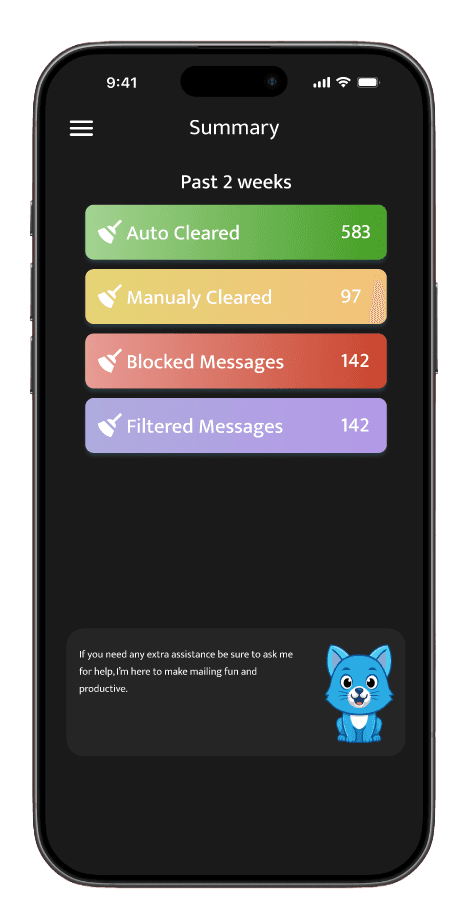
Get a bi-weekly summary of cleared mails, blocked, and filtered messages. The app will keep track of mail, including mail cleared, blocked and filtered. Will keep track of senders filtering and blocking out scams and spam.
User testing
One-on-one usability tests were conducted observing user behavior, interaction and response towards the prototype. Participants' reception noted both positive and negative reactions, whilst providing valuable feedback. Participants were asked to complete tasks whilst navigation time and verbal response were observed and recorded.
Some users expressed that structure and navigation could use improvement. One suggestion was the addition of a navigation bar or menu underneath of navigation bar, displaying different categories including different meats, vegetables, and bases ie. rice or noodles.The tester suggested a revamp of the app structure, adopting a larger grid based structure, enlarging items whilst, including greater detail of the item itself underneath the item itself.
A separate user interviewed suggested removing the search bar at the top of each screen or simply converting it into a small icon, freeing up screen real estate which could then be replaced with filtering tags or options. Prioritizing minimalism would modernize the design whilst also minimising distractions contributing to a neater UI.
Recommendations
Addition of engaging interactions such as addition of app mascot which guides, highlights and gives summaries.
Include Additional Sorting tags
Improve flow and smoothness of interactions
Conclusion
Continued development is needed, leaning heavily into a playful aspect that a mascot could bring to further individualize itself offering a distinct unique value. Elements such a dynamic mascot that changes or reacts based off using certain functions, completing or cleaning a certain number of emails could contribute towards a progress bar that changes the state of the mascot heavily leaning into the idea. Additionally, formatting when selecting filters requires improvement. Inclusion of a clearer on boarding process may need to be included instead of self-guided learning through tool tips.
Results
User research comprised of three full-time working adults, 2 male and one female. The ages of those interviewed, included a 24 and 56-year-old male and a 57-year-old female. All three interviewed frequently and heavily use email within the working week, one of them rarely uses personal email.
Time spent using email
Out of 3 respondents 2 said, 5 days a week, whilst the other 6-7 days a week.
Positive and negative experiences using email
A general consensus conveyed that email, allows communication to people, other tools are better for direct communication, and design is mostly utilitarian serving only to complete its function. Has it’s necessary features, but not much else.
Receiving spam and sorting through clutter
Two respondents don’t have any issues, deleting most unwanted emails and only reading relevant ones. Second respondent has many junk mails, mostly shopping and promotions and usually has to spend time manually clearing them.
Email sorting systems
All respondents said it would be helpful for more organization tools to be added, manual flagging could be improved via keyword screening or sorting highlighting senders. Whilst email has sorting features, specific targeting of certain mails can be improved to make them easy to find.
Improving sorting systems and email
Has a good experience using outlook, but could possibly improve it. Automatic sorting would still need to be screened without deleting without permission.
User Insights
There were total three participants interviewed. All respondents noted that email was perfectly functional for work related purposes. All respondents noted that email had all its necessary functions making it perfect at what it needs to do: send and read messages. However, two of them noted that organization functionality could be improved. 2 users would sort emails using some of noting that flagging systems or search were the best ways to keep track of emails, however all needed to be manually checked. 2 users were unsure of how to improve sorting and email prioritization whilst one suggested more categorization and filtering options, whilst the other felt it worked perfectly fine.
User Needs
To create a first prototype, we must identify the target audience’s needs and goals. Who is the target audience? Office workers, contractors, corporate jobs, and workers of this variety. This product will be most likely used by those who belong in these industries whilst are most likely to be aged 22+. The goal is to help reduce the time inside work and outside work hours spending time sorting through emails, whilst also sorting out those emails to their exact locations improving efficiency and productivity. It has first been adopted into a mobile app, but desktop is also a priority.
User Personas
Results
User research comprised of three full-time working adults, 2 male and one female. The ages of those interviewed, included a 24 and 56-year-old male and a 57-year-old female. All three interviewed frequently and heavily use email within the working week, one of them rarely uses personal email.
Time spent using email
Out of 3 respondents 2 said, 5 days a week, whilst the other 6-7 days a week.
Positive and negative experiences using email
A general consensus conveyed that email, allows communication to people, other tools are better for direct communication, and design is mostly utilitarian serving only to complete its function. Has it’s necessary features, but not much else.
Receiving spam and sorting through clutter
Two respondents don’t have any issues, deleting most unwanted emails and only reading relevant ones. Second respondent has many junk mails, mostly shopping and promotions and usually has to spend time manually clearing them.
Email sorting systems
All respondents said it would be helpful for more organization tools to be added, manual flagging could be improved via keyword screening or sorting highlighting senders. Whilst email has sorting features, specific targeting of certain mails can be improved to make them easy to find.
Improving sorting systems and email
Has a good experience using outlook, but could possibly improve it. Automatic sorting would still need to be screened without deleting without permission.
User Insights
There were total three participants interviewed. All respondents noted that email was perfectly functional for work related purposes. All respondents noted that email had all its necessary functions making it perfect at what it needs to do: send and read messages. However, two of them noted that organization functionality could be improved. 2 users would sort emails using some of noting that flagging systems or search were the best ways to keep track of emails, however all needed to be manually checked. 2 users were unsure of how to improve sorting and email prioritization whilst one suggested more categorization and filtering options, whilst the other felt it worked perfectly fine.
User Needs
To create a first prototype, we must identify the target audience’s needs and goals. Who is the target audience? Office workers, contractors, corporate jobs, and workers of this variety. This product will be most likely used by those who belong in these industries whilst are most likely to be aged 22+. The goal is to help reduce the time inside work and outside work hours spending time sorting through emails, whilst also sorting out those emails to their exact locations improving efficiency and productivity. It has first been adopted into a mobile app, but desktop is also a priority.
Journey Map
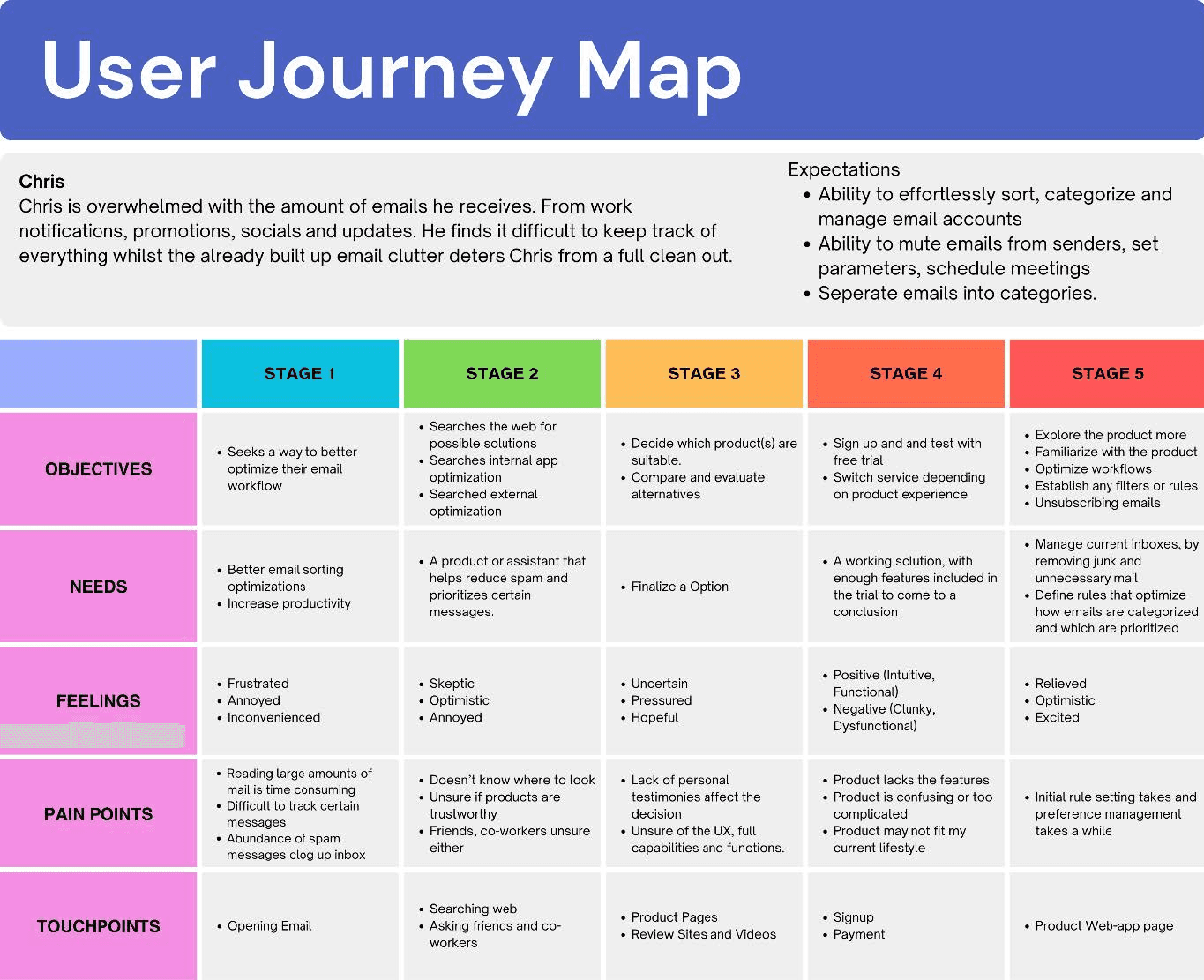
The user journey map below highlights key aspects from initial discovery to post-purchase usage. It highlights needs and pain points that come in each stage. Touch points highlights points where the user interacts and engages with.
Journey Map
The user journey map below highlights key aspects from initial discovery to post-purchase usage. It highlights needs and pain points that come in each stage. Touch points highlights points where the user interacts and engages with.
User Flow
Before sketching and wire-framing, the user flow was created outlining the structure and app navigation. The outline showcasing the general flow of the app:
1. The on-boarding process begins with standard signup process; where users will enter their details linking their email account.
2. Users will be told some of the basic functionalities and features, guided through the process.
3. Most app functionalities are accessible from the dashboard(home), otherwise accessed through the side menu. The navigation is split into 3 drop-downs; profile settings, tools and quick access. Profile settings relate to app settings, payments, accounts, help and terms and conditions. Tools relate to functions that sort and clean emails, and quick access resembles your standard email UI, for easy access without switching between apps.
4. View summaries that show messages, cleared, filtered, sorted and blocked, keep tangible use and feedback after each clean. Will refresh bi-weekly,app will give updates in summaries with future.
Information Architecture
User Flow
Before sketching and wire-framing, the user flow was created outlining the structure and app navigation. The outline showcasing the general flow of the app:
1. The on-boarding process begins with standard signup process; where users will enter their details linking their email account.
2. Users will be told some of the basic functionalities and features, guided through the process.
3. Most app functionalities are accessible from the dashboard(home), otherwise accessed through the side menu. The navigation is split into 3 drop-downs; profile settings, tools and quick access. Profile settings relate to app settings, payments, accounts, help and terms and conditions. Tools relate to functions that sort and clean emails, and quick access resembles your standard email UI, for easy access without switching between apps.
4. View summaries that show messages, cleared, filtered, sorted and blocked, keep tangible use and feedback after each clean. Will refresh bi-weekly,app will give updates in summaries with future.
Information Architecture
Low Fidelity Sketch Prototype
The development of the user flow adapted into app screens to see the flow and organization of elements needed for the app. The home page acts like a hub page, all core features are accessible on one page.
Low Fidelity Sketch Prototype
The development of the user flow adapted into app screens to see the flow and organization of elements needed for the app. The home page acts like a hub page, all core features are accessible on one page.
Low Fidelity Sketch Prototype
The development of the user flow adapted into app screens to see the flow and organization of elements needed for the app. The home page acts like a hub page, all core features are accessible on one page.
Final
Final
Inbox
With API users are able to access their mail inboxes able to sort, view and manage the same as through the their email client. Filters are available to sift through mail quickly and efficiently segmented into time segments to identify and prioritize important mail.
Inbox
With API users are able to access their mail inboxes able to sort, view and manage the same as through the their email client. Filters are available to sift through mail quickly and efficiently segmented into time segments to identify and prioritize important mail.
Inbox
With API users are able to access their mail inboxes able to sort, view and manage the same as through the their email client. Filters are available to sift through mail quickly and efficiently segmented into time segments to identify and prioritize important mail.
Rule Creation
Create rules which sort through emails. Send them to folders, the bin, pause notifications. Tag mail from senders to either prioritize and sort through them. Rule creation gives the user direct traffic control of incoming mails and preexisting mail.
Summaries
Get a bi-weekly summary of cleared mails, blocked, and filtered messages. The app will keep track of mail, including mail cleared, blocked and filtered. Will keep track of senders filtering and blocking out scams and spam.
Rule Creation
Create rules which sort through emails. Send them to folders, the bin, pause notifications. Tag mail from senders to either prioritize and sort through them. Rule creation gives the user direct traffic control of incoming mails and preexisting mail.
Rule Creation
Create rules which sort through emails. Send them to folders, the bin, pause notifications. Tag mail from senders to either prioritize and sort through them. Rule creation gives the user direct traffic control of incoming mails and preexisting mail.
Summaries
Get a bi-weekly summary of cleared mails, blocked, and filtered messages. The app will keep track of mail, including mail cleared, blocked and filtered. Will keep track of senders filtering and blocking out scams and spam.
Summaries
Get a bi-weekly summary of cleared mails, blocked, and filtered messages. The app will keep track of mail, including mail cleared, blocked and filtered. Will keep track of senders filtering and blocking out scams and spam.
User testing
One-on-one usability tests were conducted observing user behavior, interaction and response towards the prototype. Participants' reception noted both positive and negative reactions, whilst providing valuable feedback. Participants were asked to complete tasks whilst navigation time and verbal response were observed and recorded.
Some users expressed that structure and navigation could use improvement. One suggestion was the addition of a navigation bar or menu underneath of navigation bar, displaying different categories including different meats, vegetables, and bases ie. rice or noodles.The tester suggested a revamp of the app structure, adopting a larger grid based structure, enlarging items whilst, including greater detail of the item itself underneath the item itself.
A separate user interviewed suggested removing the search bar at the top of each screen or simply converting it into a small icon, freeing up screen real estate which could then be replaced with filtering tags or options. Prioritizing minimalism would modernize the design whilst also minimising distractions contributing to a neater UI.
Recommendations
Addition of engaging interactions such as addition of app mascot which guides, highlights and gives summaries.
Include Additional Sorting tags
Improve flow and smoothness of interactions
Conclusion
Continued development is needed, leaning heavily into a playful aspect that a mascot could bring to further individualize itself offering a distinct unique value. Elements such a dynamic mascot that changes or reacts based off using certain functions, completing or cleaning a certain number of emails could contribute towards a progress bar that changes the state of the mascot heavily leaning into the idea. Additionally, formatting when selecting filters requires improvement. Inclusion of a clearer on boarding process may need to be included instead of self-guided learning through tool tips.
User testing
One-on-one usability tests were conducted observing user behavior, interaction and response towards the prototype. Participants’ reception noted both positive and negative reactions, whilst providing valuable feedback. Participants were asked to complete tasks whilst navigation time and verbal response were observed and recorded.
Some users expressed that structure and navigation could use improvement. One suggestion was the addition of a navigation bar or menu underneath of navigation bar, displaying different categories including different meats, vegetables, and bases ie. rice or noodles.The tester suggested a revamp of the app structure, adopting a larger grid based structure, enlarging items whilst, including greater detail of the item itself underneath the item itself.
A separate user interviewed suggested removing the search bar at the top of each screen or simply converting it into a small icon, freeing up screen real estate which could then be replaced with filtering tags or options. Prioritizing minimalism would modernize the design whilst also minimizing distractions contributing to a neater UI.
Recommendations
Addition of engaging interactions such as addition of app mascot which guides, highlights and gives summaries.
Include Additional Sorting tags
Improve flow and smoothness of interactions
Conclusion
Continued development is needed, leaning heavily into a playful aspect that a mascot could bring to further individualize itself offering a distinct unique value. Elements such a dynamic mascot that changes or reacts based off using certain functions, completing or cleaning a certain number of emails could contribute towards a progress bar that changes the state of the mascot heavily leaning into the idea. Additionally, formatting when selecting filters requires improvement. Inclusion of a clearer on boarding process may need to be included instead of self-guided learning through tool tips.
User Personas
© Rocco Leung
roccoleungg@gmail.com
Resume
© Rocco Leung
roccoleungg@gmail.com
Resume
© Rocco Leung
roccoleungg@gmail.com
Resume
© Rocco Leung
roccoleungg@gmail.com
Resume